← Back to products
LIVE · ANDROID
PushBin (To-dos & Routines) app icon

PushBin To-dos & Routines

Formerly SalimButton

Today's to-dos, done with a tap

PushBin (To-dos & Routines) is an Android app for ticking off tasks for work, study, and home, along with everyday routines like medication, cleaning, and laundry — one tap each. It comes with repeat reminders, a random pick for what to do next, a focus timer, and home screen widgets. It's free, needs no sign-in, and keeps your to-dos on your phone.

Formerly SalimButton. If you already have it installed, your to-dos and history carry over after the update.

Platform
Android 10+
Built with
Flutter
Storage
On-device (SQLite)
Sign-in
Not required
Price
Free · banner ad
App language
Korean

com.slb.salimbutton · version 1.0.8

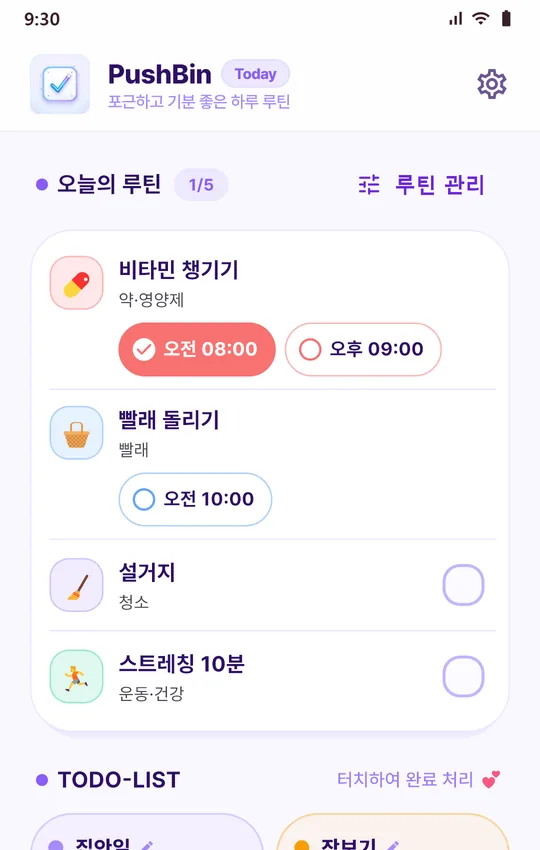
Today screen in Korean: today's routines such as taking vitamins and doing laundry at the top, with the grouped to-do list below
Today — check off routines and grouped to-dos on one screen.
SCREENS

Take a look

Swipe sideways to see all eight screens. App language: Korean — the app itself is available in Korean only.

  • Today screen: routine check-offs and the grouped to-do list
    01 Today Tap through today's routines and grouped to-dos.
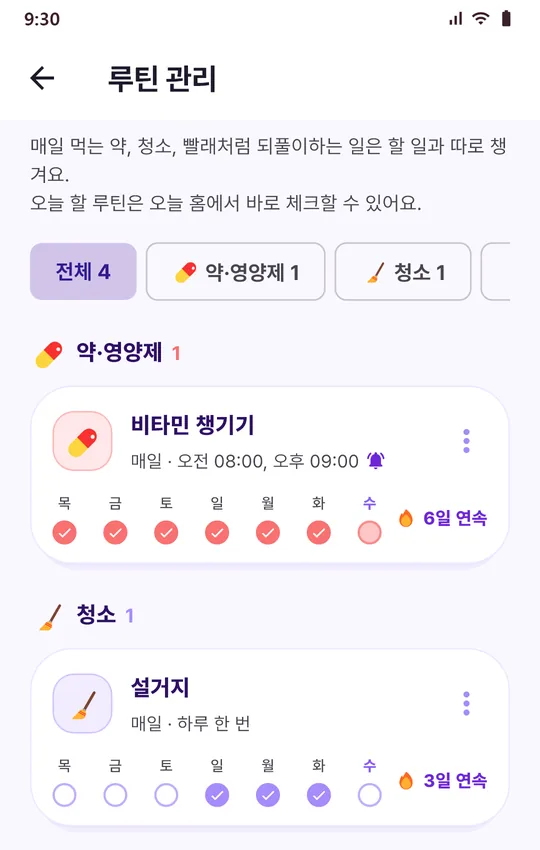
  • Routines screen: routines grouped by category such as medication and cleaning, with weekday check marks and streaks
    02 Routines By category, with the last 7 days and your streak.
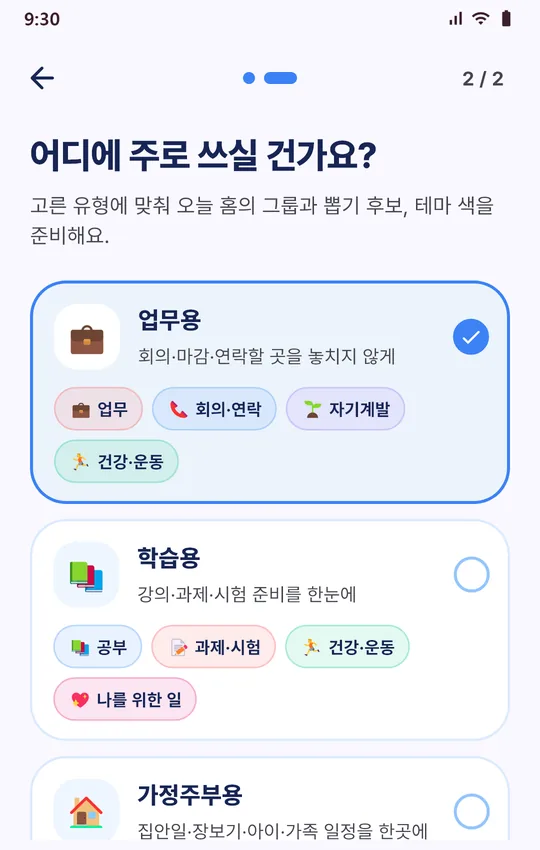
  • First-run setup screen: choosing a usage type such as work, study, or homemaker
    03 First run Pick a usage type to get groups, pick candidates, and a theme color.
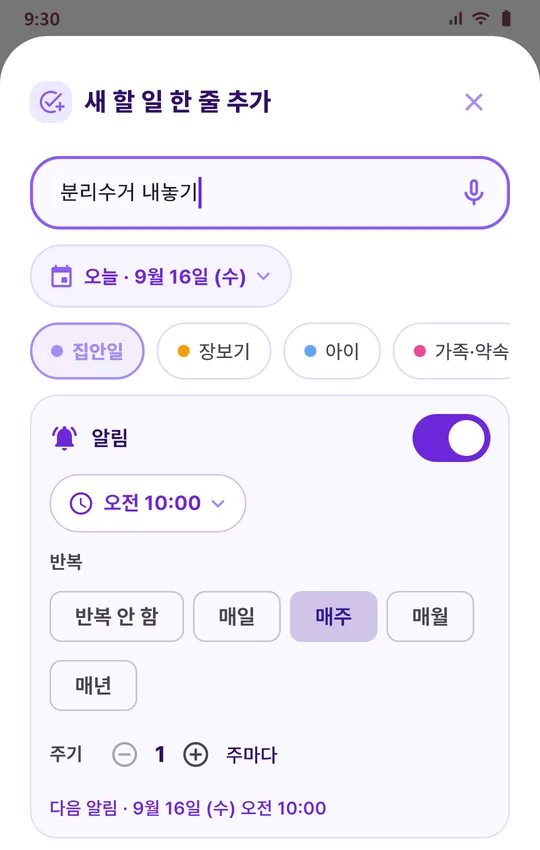
  • Add a to-do screen: voice input mic, date, group chips, reminder time, and a weekly repeat
    04 Add a to-do Type a line or say it, then set a reminder and repeat.
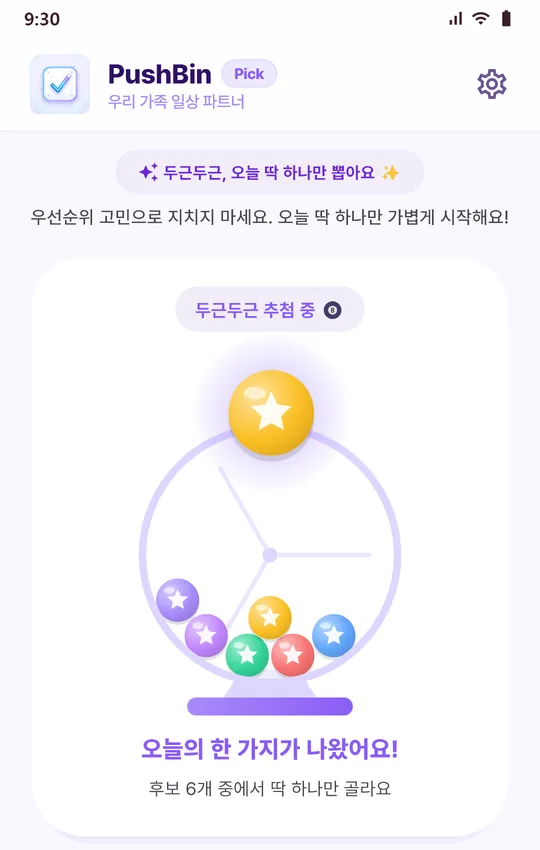
  • Today's pick screen: a lottery-ball drum drawing one candidate
    05 Today's pick Can't decide where to start? Draw just one.
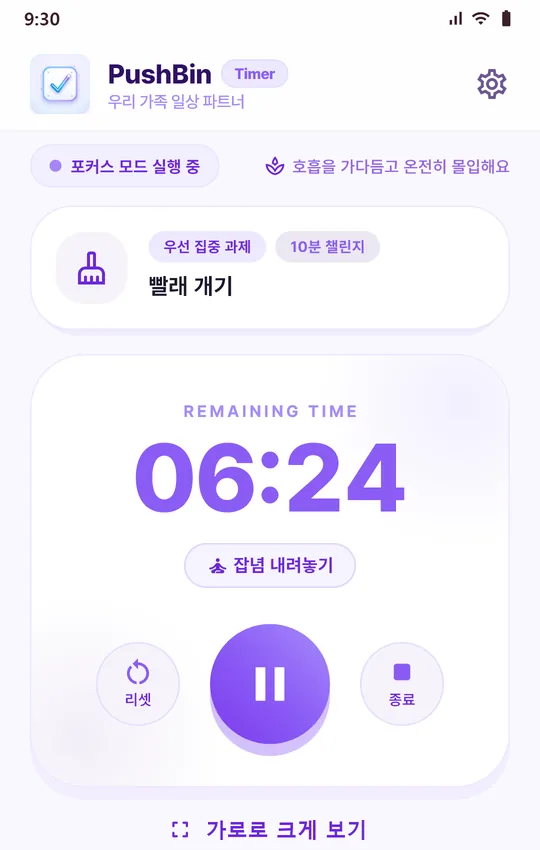
  • Timer screen: 06:24 remaining in large digits, with a landscape full-screen button
    06 Timer Big remaining time, or go full-screen in landscape.
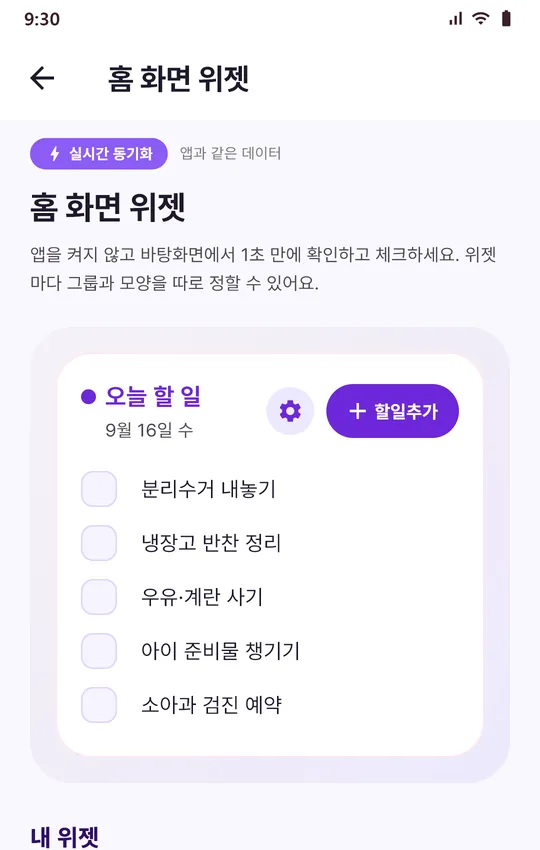
  • Home screen widget settings: a preview of the today widget with an add button
    07 Home screen widget Check off and add to-dos without opening the app.
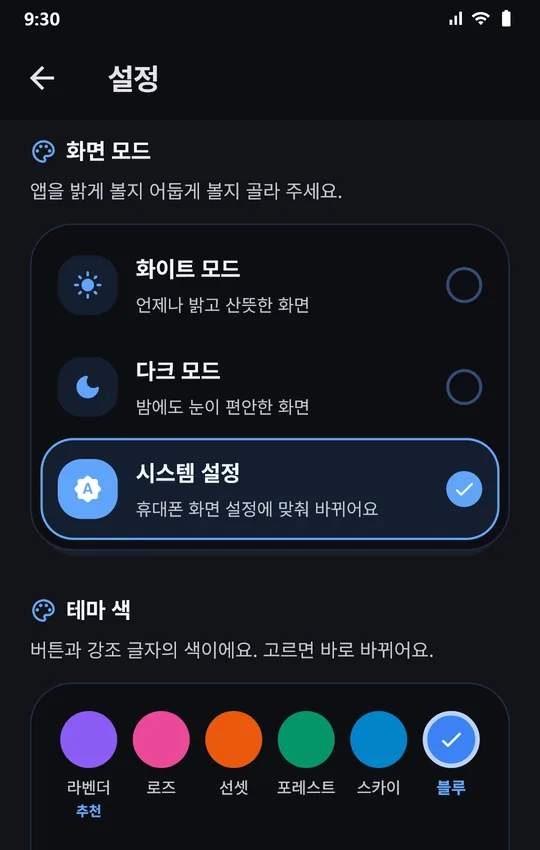
  • Settings in dark mode: white, dark, and system display modes and six theme colors
    08 Settings · dark mode Three display modes and six theme colors.
FEATURES

Jot it, tap it, don't forget it

Finish today's to-dos right from the home screen, and keep recurring things on track as routines. Reminders, repeats, the random pick, and the timer tie it all together.

A today board, by group

To-dos are laid out by group, two to a row. Tap one to mark it done, undo right away if you slipped, and watch your progress for the day. Long-press a card to drag it into a new order or over to another group, and create new groups from a template or from scratch.

Quick add and voice input

Type a single line, or tap the mic and say it — voice input uses your phone's speech recognition service. The date defaults to today, and you can change it if you need to.

Routines, kept separate

Medication & supplements, cleaning, laundry, exercise & health, meals & cooking, and more live apart from your to-dos. Run them every day, on weekdays, on weekends, or on the days you pick, and check them up to four times a day — morning and evening pills, say. Tap “Done” (했어요) on the reminder to check one off without opening the app. You'll see the last 7 days and your streak, and pausing a routine keeps its history.

Reminders and repeats

Give any to-do a reminder time and repeat it daily, weekly, monthly, or yearly, at the interval you want (every 2 weeks, for example). A repeating to-do comes back once its next date arrives, and reminders are rescheduled after your phone restarts. Share a to-do or reminder through the Android share sheet — to KakaoTalk, text messages, and more.

Today's pick

When you can't decide where to start, draw one from the candidates you've set up in 10-, 30-, or 60-minute blocks, like rolling a lottery ball. You can also send a candidate straight to today's card, and start a timer on whatever gets picked.

A timer you can see

The time left shows in big digits, and you can flip it to full-screen landscape. Change the timer color, and get an alert when time's up even if the app is closed. Finishing is up to you — it's only recorded when you tap complete.

History on a calendar

Look back on past days in a calendar. Tap a date to open a timeline of what you added and finished, plus your picks and timer sessions, in order. Upcoming repeat dates are marked too.

Home screen widgets

Check things off from your home screen without opening the app, or tap “Add” (할일추가) to jot one down. Give each group its own widget, and use ⚙ to set the title, background color, transparency, font, and text size.

Make it yours

Choose from six theme colors — lavender, rose, sunset, forest, sky, and blue — and a white, dark, or system display mode. Changes apply instantly.
FIRST RUN

Set up for the way you'll use it

The first time you open the app, you choose your gender (female or male) and how you'll mainly use it. Based on that, four to-do groups, pick candidates, and a theme color are ready for you. You can change this anytime in Settings.

Work

Stay on top of meetings, deadlines, and people to get back to

  • Work
  • Meetings & calls
  • Self-growth
  • Health & fitness

Study

Lectures, assignments, and exam prep at a glance

  • Study
  • Assignments & exams
  • Health & fitness
  • Me time

Homemaker

Housework, groceries, kids, and family plans in one place

  • Housework
  • Groceries
  • Kids
  • Family & plans

Everyday

Looking after yourself, from exercise and hobbies to money

  • Housework
  • Me time
  • Health & fitness
  • Money

Group names appear in Korean in the app; the English here is for reference.

NEW TAB · 1.0.7–1.0.8

Today's News: an affirmation and a news briefing

Before you dive into your to-dos, skim today's affirmation and the day's news on a single screen.

Today's affirmation

365 affirmations, one a day in date order starting January 1. If you add your own, they take turns with the built-in ones.

Daily news summary

A summary generated with AI early each morning on a server run by Eurion: one line for the day, a sentence or two per topic, and the articles behind them. On days without a summary, you get the top articles for each topic instead.

Your own news cards

Write your own updates as cards and pin them to the top.

News by topic

  • Top stories
  • Society
  • Economy
  • Health
  • Science & Tech
  • Entertainment
  • Sports
  • World

Articles open in your external browser.

News comes from Eurion's server; if the server doesn't respond, the app fetches Google News RSS directly. Without a connection, everything else — to-dos, routines, reminders — keeps working as usual.

DATA · ADS · PERMISSIONS

Data, ads, and permissions

Here's plainly what gets stored where, and when the app goes online.

Your to-dos stay on your phone

To-dos, routines, and history are stored only on your device (SQLite) and are never sent to our servers. There's no sign-in or account, either.

A banner ad at the bottom of Settings

To keep the app free, there's a banner ad (Google AdMob) at the bottom of the Settings screen. The ad SDK uses identifiers such as your advertising ID.

Online for two things only

The app uses the network only for ads and Today's News (fetching news and affirmations). Those requests carry only values like the topic and app version — nothing that identifies you.

Backup and restore

Save a backup file (JSON) to a location you choose and load it back later. It includes to-dos, groups, routines, history, your affirmations, and news cards; device settings such as display mode and theme aren't included.

Permissions it asks for

  • Notifications

    POST_NOTIFICATIONS

    Used for
    Timer alerts and to-do and routine reminders
    If you decline
    You just won't see notifications; everything else works.
  • Exact alarms

    SCHEDULE_EXACT_ALARM

    Used for
    Reminders right on time, even with the screen off
    If you decline
    Reminders may arrive a few minutes late.
  • Run at startup

    RECEIVE_BOOT_COMPLETED

    Used for
    Rescheduling reminders after your phone restarts
    If you decline
    Granted at install; you won't be asked.
  • Microphone

    RECORD_AUDIO

    Used for
    Adding to-dos by voice. The app doesn't save or send recordings.
    If you decline
    Just type instead.
  • Network access

    INTERNET

    Used for
    The banner ad and Today's News (news and affirmations)
    If you decline
    Granted at install; you won't be asked.
Read the Privacy Policy

SalimButton is now PushBin

If you already have SalimButton installed, the update changes only the name and icon — your to-dos and history carry right over. The package name (com.slb.salimbutton) and the Google Play link stay the same.

Not the same app as Pushbin, the notification archive

Eurion also makes Pushbin (com.hj.pushbin), which archives your notifications and tallies spending from card and bank alerts. The names are close, but they're separate apps. For to-dos and routines, get PushBin (To-dos & Routines); for a notification archive and spending tracker, get Pushbin.

See Pushbin (Notification Archive & Spending Tracker)

Tap through today's to-dos

Free on Google Play. Start right away with no sign-in — your to-dos and history stay on your phone.